Manipulating strings in Python is one of the most common tasks, and Python offers incredibly simple and powerful tools for it. In this article, we will explore how to manipulate strings and use the input function to capture user data. Whether you are a beginner or looking to reinforce your knowledge, keep reading!
What Are Strings in Python?
Strings are sequences of characters that represent text. In Python, anything between single quotes (‘) or double quotes (“) is considered a string.
name = 'John'
message = "Welcome to the Python course!"
Strings can contain letters, numbers, spaces, and special symbols. Because they are sequences, each character has an index, starting at 0. This will be useful when we talk about slicing.
Capturing User Data with input()
The input() function is used to capture data typed by the user in the console. By default, it always returns a string.
See the example below:
name = input("What is your name? ")
print("Hello, " + name + "! Welcome.")
When the user types their name and presses Enter, the program concatenates the captured string with the message. This is an important point: whenever you use input(), the value received is treated as a string, even if it contains numbers.
If you need to use these values as numbers, just convert them with the int() or float() functions.
age = int(input("How old are you? "))
print(f"You are {age} years old.")
Here, I used int() to turn the received string into an integer.
Manipulating Strings in Python: Main Functions and Methods
Now that you know how to capture data, let’s learn how to manipulate strings. Python offers very useful methods for handling text.
1. Changing the case with .upper() and .lower()
You can convert the letters of a string to uppercase or lowercase:
name = input("Enter your name: ")
print(name.upper())  # Converts to uppercase
print(name.lower())  # Converts to lowercase
2. Removing spaces with .strip()
Users often type extra spaces by accident. To fix this, use .strip():
text = input("Type something with spaces: ")
print(text.strip())
If you only want to remove spaces on the left or on the right, you can use .lstrip() (left strip) or .rstrip() (right strip).
3. Replacing parts of the text with .replace()
Replacing words or characters in a string is easy with .replace():
sentence = input("Type a sentence: ")
new_sentence = sentence.replace("a", "@").replace("e", "3")
print(new_sentence)
In this example, we replace the letter a with @ and e with 3. Use this technique to customize messages!
4. Slicing Strings
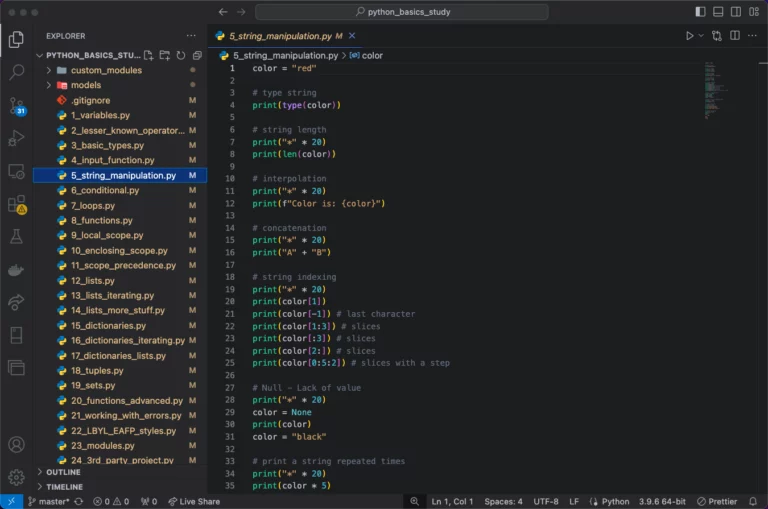
Because strings are sequences, we can access just parts of them. This is called slicing:
text = "Python is amazing!"
print(text[0:6])  # Result: Python
print(text[-8:])  # Result: amazing!
Here, I used [start:end] to define the piece I needed. Negative values let you count from the end.
5. Splitting Strings with .split()
Another way to manipulate strings in Python is with the .split() method, which splits strings into lists using a delimiter:
sentence = "Python is amazing!"
words = sentence.split(" ")  # Splits on spaces
print(words)  # Result: ['Python', 'is', 'amazing!']
6. Concatenating Strings
Concatenating means joining two or more strings. There are several ways to do this in Python:
- Using the + operator:
name = input("What is your name? ")
print("Hello, " + name + "! How are you?")- Using f-strings (Python 3.6+):
name = input("What is your name? ")
print(f"Hello, {name}! How are you?")
F-strings make code more readable and easier to write. I always recommend using this method!
7. Checking the Content of a String
To check whether a word or character is present in a string, use in:
sentence = input("Type a sentence: ")
if "Python" in sentence:
    print("You mentioned Python!")
else:
    print("Python was not found.")
The in keyword makes searching inside strings much easier.
Practicing String Manipulation in Python
Let’s put everything we learned together in a small program:
name = input("Enter your name: ").strip()
age = int(input("Enter your age: "))
sentence = f"Hello, {name.upper()}! You are {age} years old."
print(sentence.replace("A", "@"))
This program captures the user’s name and age, removes extra spaces, and applies manipulations to the string.
Conclusion
Manipulating strings in Python is an essential skill for any programmer. In this article, you learned how to capture user data with input() and use powerful methods such as .upper(), .replace(), and slicing. Practice a lot to master these techniques!
In the next lesson, we will explore how conditional statements work in Python. Don’t miss it! Meanwhile, check out the official Python documentation on strings to deepen your knowledge even further.
Also see the previous lesson, where we talked about Python’s basic data types.
Ready to keep improving your Python skills? Then practice the concepts presented here and share this course with your friends!