In this ninth lesson of the mini course, I want to talk about one of the most versatile data types in the language: lists in Python. They are incredibly useful in day-to-day development and show up in practically every kind of project. Here, I will show you how to create lists, work with different data types in them, add and remove items, combine lists, access elements, use slices, and much more.
How to create lists in Python
Creating a list in Python is very simple. Just use square brackets:
fruits = ["apple", "banana", "orange"]
You can also use the list() function to convert other iterables into a list:
letters = list("python")
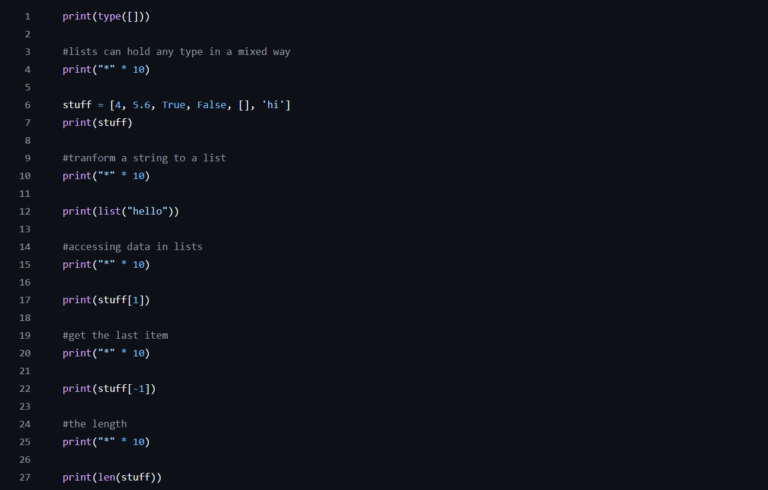
One of the big advantages of lists in Python is that they can contain elements of different types:
mixed = [1, "text", 3.14, True]
This flexibility is handy in specific situations, but it is always a good idea to keep data types consistent when possible, especially when other people will read or maintain your code.
Adding and removing list items
While code is running, we often need to modify lists by adding or removing elements. Fortunately, Python makes this very easy.
To add an item to the end of the list, I use the append() method:
fruits.append("pineapple")
If I need to add it at a specific position, I use insert():
fruits.insert(1, "strawberry") # inserts strawberry at position 1
You can also add several elements at once with extend():
fruits.extend(["grape", "watermelon"])
To remove an item, there are several options:
fruits.remove("banana") # removes the first occurrence of the value
Or use pop() to remove by index (and return the removed value):
item = fruits.pop(0)
If the index is invalid, pop() raises an error, so it is always worth checking the list’s size first with len().
And if the goal is to clear everything at once:
fruits.clear()
Combining lists in Python
Another essential point about lists in Python is the ability to combine them. The most direct way is with the + operator:
list1 = [1, 2]
list2 = [3, 4]
combined = list1 + list2
If I want to add all the items of one list to an existing one, I prefer extend():
list1.extend(list2)
This difference matters: + creates a new list, while extend() modifies the original.
Also, for very large lists, extend() tends to perform better.
Accessing positions and slicing
In Python, each list item has an index, starting at zero. I can access elements directly with square brackets:
first_fruit = fruits[0]
To get the last item, I use negative indexes:
last_fruit = fruits[-1]
A feature I use a lot is slices. With them, I can easily grab parts of the list:
middle = fruits[1:3] # items from index 1 to 2
If I want the first three:
start = fruits[:3]
Or the last three:
end = fruits[-3:]
I can also use steps in slices:
evens = numbers[::2] # takes every second item
This technique is great when I want to manipulate or filter data quickly without explicit loops.
Iterating over lists
When developing a program, we very often need to iterate over lists. The most common way is to use a for loop:
for fruit in fruits:
    print(fruit)
If I also need the index, I use enumerate():
for i, fruit in enumerate(fruits):
    print(f"{i}: {fruit}")
And when I want to transform the list’s items based on a condition, a useful approach is a list comprehension:
uppercase = [f.upper() for f in fruits]
This feature makes the code cleaner and more expressive. I can also add a condition:
long_names = [f for f in fruits if len(f) > 5]
Extra tips about lists in Python
A few tips I usually apply to avoid pitfalls:
- I avoid modifying a list while iterating over it. This can lead to unexpected behavior.
- I always check whether an item is in the list before operating on it, using in:
if "apple" in fruits:
    fruits.remove("apple")
- To copy a list without sharing the reference, I use copy() or slices:
copy1 = fruits[:]
copy2 = fruits.copy()
This prevents accidental changes to the original list when I pass copies to functions or helper variables.
Conclusion
A solid understanding of how to work with lists in Python is fundamental for any developer starting out with the language. They appear in every context, from simple scripts to complex projects. Knowing how to create, modify, combine, and iterate over lists will give you much more freedom to write clean, efficient code.
If you want to explore further, I recommend the official documentation on lists.
In the next lesson, we will explore dictionaries, another data structure that complements what we have covered so far.